Skip to content

No sign-up and nothing to pay.

twitter account hacked · x account hacked and email changed · x account hacked how to recover

Hack Twitter account sites show no password and no chat. X account hacked? These are the official ways back

A “hack Twitter account” page that asks only for a username has nothing to read from — and if it is your own X account hacked, the way back runs through X's own pages.

Reconstruction for explanation · not a real X screen

A platform is not supposed to keep passwords in readable form, and a page that is not logged in to an account has no messages to show. The X pages for a changed email or a lost login are listed here by address.

Your route back

X account hacked: pick the case that matches what you still control

Steps as X's help pages describe them in search-result summaries. Labels in your app may differ; the address of the official page is given in each route.

Still signed in: new password before anything else

Source: help.x.com/en/safety-and-security/x-account-compromised.

  1. Change the password in settings. A password reset ends every active session except the one you change it from.
  2. Make sure the email account attached to X is secure: its own password, its own second factor.
  3. Revoke access for third-party apps you do not recognise.
  4. Update the password in the apps you do trust, so they stop failing with the old one.
  5. Open the list of active sessions in settings — X's help names the section Apps and sessions — and end any you cannot place. After that, switch on two-factor authentication.

The limit X's help notes that ending a session does not necessarily remove data already cached on that device — Direct Messages, for example.

Six steps after you are back

Read this first

How the X steps on this page were checked — and what that means for you

On 11 November 2026 X's help centre, help.x.com, was closed to automated reading by a bot check, and we did not go around it. The recovery, password-reset and two-factor steps on this page come from the summaries search engines show for those help pages — not from the full text. On 12 November one of the articles opened directly in a browser: the one on third-party apps and sessions, so what this page says about Apps and sessions, ending one or all other sessions, and Direct Messages cached on a device is read first-hand. The summaries are enough to say what X tells an owner to do and on which page; they are not enough to quote menu and button names.

So each step carries the address of the official page it comes from — open it and follow X's current wording — and a plain description stands in where we could not confirm a label.

If a step here disagrees with what help.x.com shows you today, follow help.x.com.

  • Compromised account: help.x.com/en/safety-and-security/x-account-compromised
  • Password reset: help.x.com/en/managing-your-account/forgotten-or-lost-password-reset
  • Log-in issues: help.x.com/en/managing-your-account/log-in-issues
  • Two-factor authentication: help.x.com/en/managing-your-account/two-factor-authentication
  • Third-party apps and sessions: help.x.com/en/managing-your-account/connect-or-revoke-access-to-third-party-apps

Hack Twitter account sites

“Hack Twitter account”, “read X chat”: the offer, and what an X account actually allows

We found no published teardown of a site built specifically around X, so each answer below leans on how the same class of page behaves elsewhere — and says where. The tools in general are taken apart on password hack tools.

What is claimed

“Hack Twitter account online: type the @handle, get the password.”

What actually happens

The @handle is the public half of an X login. Services are expected to store passwords as salted hashes that cannot be reversed, so there is nothing a stranger's web page could pull out for you. What a visitor gets instead is a progress animation followed by a demand to “verify” — on the fake generator Malwarebytes examined (built around another platform), that demand led to data-collecting surveys.

What is claimed

“Read X chat and DMs without logging in.”

What actually happens

Direct Messages are shown to a session that is signed in to the account. A page holding nothing but a handle has no session, and so nothing to display — it fills the gap with a progress bar and a “verify” button. Which ways to read messages really exist, platform by platform, is on read messages; none of them works on someone else's account from outside.

What is claimed

“Log in with X to continue” — on a page that is not x.com.

What actually happens

Here the trick does work — on the person typing. CISA describes phishing as luring people to a malicious site or tricking them into handing over a login; the fake Instagram pages Trend Micro documented accepted whatever was entered. How to tell such a copy from the real page: fake login pages.

What is claimed

“Connect this app to your X account to see who viewed your profile.”

What actually happens

X's help for a compromised account makes revoking unrecognised third-party apps a step of its own, separate from the new password — app access is reviewed on its own. An app you authorised for a gimmick is precisely what that step is written for.

What is claimed

“X recovery agent: your hacked account back today.”

What actually happens

We found no statement from X about paid recovery services. Its help sends a locked-out owner to its own support form, given in the routes below. How these profiles work is set out on our Instagram recovery page; the script is the same whatever the platform.

How it really happens

How an X password really gets out

Two of the four ways below are general and live in full on how passwords really leak. The other two are specific to how X's help describes a compromised account.

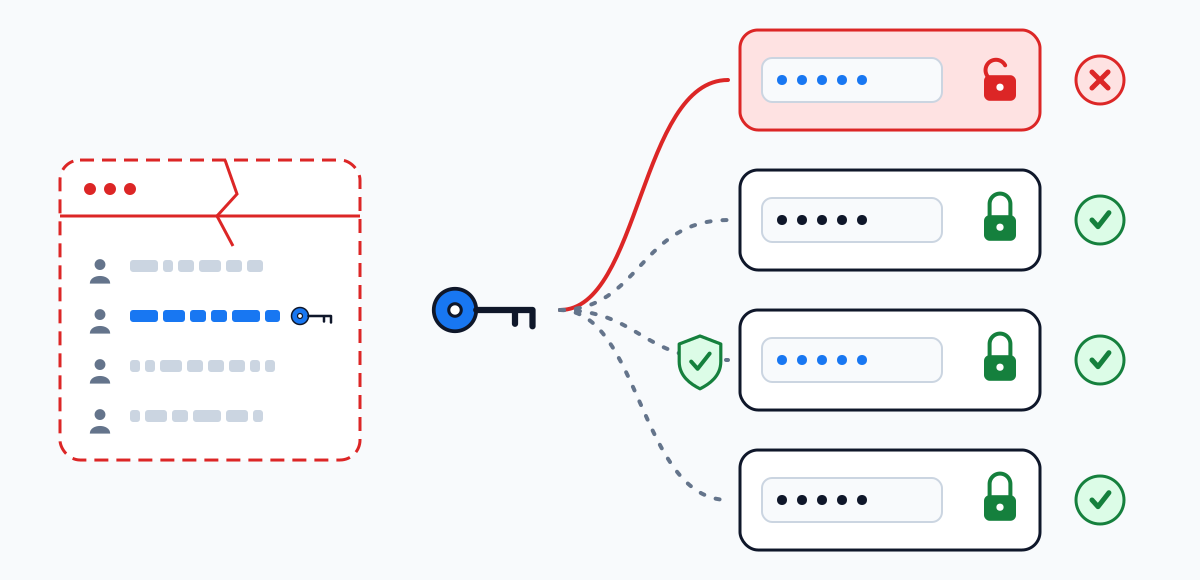
Diagram: a password stolen in one breach is replayed against four other sign-in pages; it gets into the single account that reused it and is stopped by the ones that have another password or a second factor
Replay of a breached password: it works on X only where it was reused and X asked for nothing more.
  1. 1

    A password reused from another site

    Google's 2019 study with NYU and UCSD, about Google accounts, traced most hijacking attempts to bots working from third-party breaches.

    Where the owner stops it A password that belongs to X alone. Run an old one through the leak check.

  2. 2

    A message that rushes you to a sign-in page

    The classic phishing pressure: urgency, a threat, a slightly wrong address.

    Where the owner stops it Get to X by opening the app or typing x.com yourself. Signs of a copy: fake login pages.

  3. 3

    An app that was given access

    X's help handles third-party apps as a separate step from the password change: access granted to an app is reviewed and revoked on its own.

    Where the owner stops it Go through the connected apps in settings and revoke the ones you do not recognise — the step X's help lists for a compromised account.

  4. 4

    The email behind the account

    A password reset runs through the email attached to the account, so whoever reads that mailbox can reset the password.

    Where the owner stops it Secure the mailbox first — X's help places it right after the password change.

Is my X hacked

Twitter account hacked? Six signals, and how much each one counts

X's own list of signs is on a page we could not read. These signals are the ones Meta and TikTok give for their platforms, plus the two places X's help points to. Mark what you have noticed; the score only orders what to look at first.

Two-factor authentication on X

X two-factor authentication and backup codes: what X's help says

Source: help.x.com/en/managing-your-account/two-factor-authentication, as summarised in search results.

ItemWhat X's help saysWhat follows
MethodsThree: text message, authentication app, security key.An authentication app or a security key does not depend on your phone number.
Text messageBy the search summary: since 20 March 2023 it is not available to accounts without a Premium subscription; for Premium it depends on country and carrier.If you relied on SMS codes before that date, check which method is on now.
Backup codesBy the search summary: up to five can be active at once.Keep them outside the phone that runs the authentication app.
Order of useBy the search summary: use them in the order they were generated: a code used out of order invalidates the earlier ones.Do not pick a code at random from a saved list.
After a password resetBy the search summary: all active sessions end except the one the reset was made from.A reset is also the quickest way to remove someone else's session.

We could not read this page directly. Before you rely on a detail — the Premium rule above all — open the page and check its current text.

Once you are back

Lock the X password down: six steps, in order

  1. 1

    A new password used for X only

    Length matters more than symbols; the targets are on the strength check, where you can also test the candidate before you set it.

    You should see: the reset has ended every other session.

  2. 2

    Secure the email attached to the account

    Separate password, separate second factor. Each reset of the X password passes through this mailbox.

  3. 3

    Revoke third-party apps you cannot vouch for

    Keep only what you connected yourself and still use, and update the password in those.

  4. 4

    End the sessions you cannot account for

    The list sits in settings, in the section X's help calls Apps and sessions; you can end one session or all the others.

  5. 5

    Switch on two-factor authentication

    An authentication app or a security key; a text message only if your account still has that option.

  6. 6

    Store the backup codes and respect their order

    At most five are active at a time, and they are meant to be used in the order they were generated — by the search summary of X's help, not read directly.

Questions

Hack Twitter account, X account hacked: short answers

Is there a real way to hack a Twitter account by username?

No. The handle is public and opens nothing. X accounts are lost when the owner's password ends up in a fake sign-in form or in another site's breach, when an app is granted access, or when the email behind the account changes hands. Those are the gaps to close on your own account; how to get into someone else's is not something this page covers.

Can a site show someone's X chat or DMs?

No. Without a signed-in session there are no messages to show; what such a page displays is an animation and then “verify”. See read messages for what is and is not possible.

X account hacked and email changed — is there a link that undoes it?

Instagram and Facebook send such a link to the previous address. For X, the help summaries we could read describe no such message, so we will not tell you to look for one. The route we can confirm is the support request from the email attached to the account, or the account-access form.

X account hacked and suspended — what then?

The help pages we relied on cover lost access, not suspension. We have no confirmed steps for a suspended account, so we give none.

Does ending a session remove my messages from the other device?

Not necessarily. X's help notes that data already cached on that device — Direct Messages are the example — may remain after the session is ended.

Why does this page name fewer buttons than your Instagram page?

Because we could read Instagram's help in full, and only one of X's articles directly. Where we cannot confirm a label, we give the address of X's page instead of guessing.

Take it with you

Save this page as your own plan

Print the page or save it as a PDF to keep the steps next to your phone while you go through the settings. Your checklist ticks are included.

  • The printout opens every route and every answer on this page in full
  • The file is made by your own browser — nothing is uploaded
  • This site does not log in to anyone's account and asks for no username
No sign-up and nothing to pay.