


hacked password checker · password leak check · pwned passwords
Password leaked check: find out whether yours is already a hacked password
Type a password you used to have, or one you are about to set.
Nothing you type here is sent to us or stored. Test a password you are about to set, or an old one — not the one that opens your account today.
- Only 5 hash characters sent
- No sign-up, no email
- Errors never shown as clean
The check asks Pwned Passwords, the breach database of Have I Been Pwned. Your browser hashes the password and sends only the first 5 characters of the hash. How it works
- Length
- —
- Time to guess, order of magnitude
- —
Your browser turns it into a SHA-1 hash and sends only the first five characters to Pwned Passwords, the breach database of Have I Been Pwned. The comparison is made here, on your device. The answer is one of three: found N times, not found, or could not check.
- Five characters of a hash leave your browser — never the password
- No sign-up, no email address, no username
- “Could not check” is shown as exactly that, never as a clean result
How the check works
How the password leak check works: five hash characters leave, the password stays
The method has a name, k-anonymity: the database is asked about a whole bucket of hashes at once, so its answer cannot point to yours.
- In your browser
Typed, not submitted
The field is not part of a form that posts it anywhere, and nothing is written to storage. A reload leaves it empty.
- In your browser5BAA61E4C9B93F3F0682250B6CF8331B7EE68FD8
SHA-1 turns it into 40 characters
Identical passwords give identical hashes on any device. That is the only reason a database of leaked passwords can be searched at all.
- Over the network5BAA6
Only the first five go out
The request goes to api.pwnedpasswords.com/range/ with those five characters at the end. Each position holds one of 16 symbols, so there are 1,048,576 such prefixes, and every one of them covers a crowd of unrelated passwords.
- Over the network
1D2DA4053E34E76F6576ED1DA63134B5E2A1D72CD07550416C216D8AD296BF5C0AE8E01E4C9B93F3F0682250B6CF8331B7EE68FD81E4DFB1D3F4A0F6B1A2C2A7F6E0B8D9C5A7The reply is a list, not a verdict
Each line holds the 35-character ending of a leaked hash and a count. In our measurement on 11 November 2026 one prefix returned 1,925 lines. Lines with a zero count are added as padding, so the length of the reply tells an onlooker nothing.
- In your browser1E4C9…8FD8= 1E4C9…8FD8
The match is made on your device
The page looks for your remaining 35 characters in that list. A hit shows its count; no hit means the password is absent from the data set. Whatever the outcome, the service never learns it.
What reaches the database: your IP address and the five characters, as with any request a browser sends. This page sends the request without cookies. No account, no API key and no rate limit stand in the way, and the API documentation states that websites on other domains may call it straight from the browser.
Reading the result
“Found N times”, “not found”, “could not check”: what each answer means
Each answer describes a different situation. “Could not check” is not a softer “not found” — it is no answer at all.
| Result | What it means | What it does not mean | What to do |
|---|---|---|---|
| Seen in breaches N times | Your exact password sits in the breach data that Pwned Passwords is built from; N counts its appearances there. | Nothing about whose accounts those were, and nothing about your own logins. Plenty of strangers pick identical passwords. | Retire it on every account. Have I Been Pwned's verdict on a found password: it should never be used. |
| Not found in the breach database | None of the returned endings matched yours, so this password is absent from today's data set. | Not that it is hard to guess, and not that it never reached a fake login page. Leaks nobody published never made it into the database. | Look at the strength estimate shown above it, and give the password to one account only. |
| Could not check | The request failed, or what came back was empty or unreadable, so no comparison happened. A working reply is always a list: the API has no “not found” error. | Not a clean bill. It says nothing either way about the password. | Repeat the check later, or from a different connection. |
A count of 1 is not better news than a count of 10,000. Appearing in published breach data even once puts a password on the lists that get tried.
If it was found
Your password was found in a leak: what to do, step by step
- 1
Find every account that still uses it
Email first: Instagram's help warns that whoever can read your email can probably get into your Instagram account too. After email come social accounts, then anything with money in it.
- 2
Retire it on each of them
Give every account its own replacement. On Instagram and TikTok a password change signs out the other devices. Long, unique passwords stay manageable because NIST requires services to allow password managers and autofill; how to build one is on the password strength check page.
- 3
Check whether it was actually used
“Found” describes the password, not your login history. Each account's device list answers that; where to find it on Instagram and how to read an entry: Instagram login activity.
- 4
Add a second factor
Then a leaked password on its own no longer opens the account. Which method to pick and where the switch sits on each platform: two-factor authentication.
- 5
Put the replacement through the field
Before saving the new password, type it into the field at the top.
You should see: The answer reads “Not found in the breach database”.
Not only this page
The same lookup is required of platforms
Comparing passwords with breach lists is standard practice, not this site's idea. NIST's 2025 guideline obliges services to compare every new password with a blocklist of commonly used, expected or compromised passwords — and passwords from earlier breaches are its own example.
Platforms describe doing it. TikTok's help says it regularly goes through published lists of stolen emails and passwords and asks people whose password matches to change it. Instagram warns when a password is weak or may have been exposed by outside sources, for instance by reuse on another site that had a breach.
Have I Been Pwned cites that NIST recommendation as the reason its password database exists, and anyone may query it without a subscription or a key.
So a platform warning and a “found” here mean the same thing: the password is known to more people than you. Neither one reports a login. Only the account's list of devices answers that.
Why it matters
What a hacked password is used for after a leak
How passwords get onto breach lists in the first place — phishing, reuse, malware, breaches at services — is laid out under how passwords really leak. This part is about what happens to one after it is on a list.
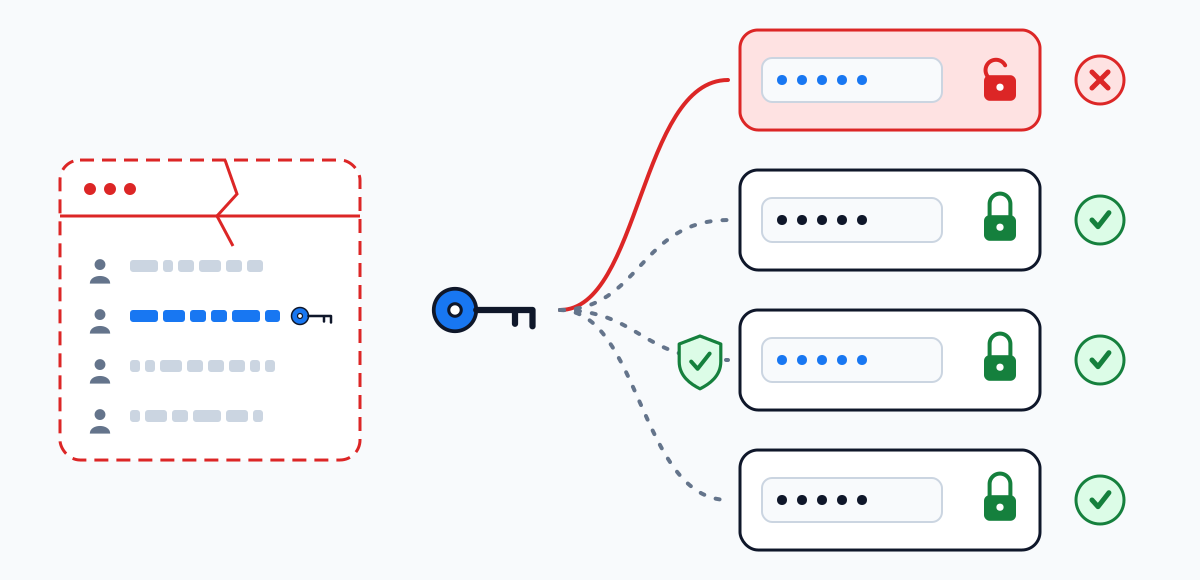
- 1
It lands on a list
Once a breach is published, its pairs of emails and passwords circulate as lists. There is no way to pull them back out of circulation.
Where the owner stops it The only remedy is to stop using that password.
- 2
It is replayed elsewhere
TikTok's help describes attackers taking leaked credentials from unrelated breaches and trying them across different platforms. Google's 2019 research on its own accounts found that most hijacking attempts came from automated bots with access to third-party password breaches.
Where the owner stops it Every account with a password of its own.
- 3
The reused account opens
Only where the same password was set and the login asked for nothing beyond it.
Where the owner stops it With a second factor, the password alone falls short.
Questions
Hacked password check: short answers
Is it safe to type a password into a leak checker?
Here the password itself never leaves the page and is not saved; what leaves is five characters of its SHA-1 hash. Still, prefer checking a former password or a candidate. The password that opens an account today belongs only on that account's login screen.
My password was found 3 times. Was my account hacked?
That count does not show it. Three is how often this exact password appears in breach data, and those may be other people who chose it. Whether anyone entered your account shows in its list of logged-in devices. Replace the password in any case.
Can I check by email address instead?
Not on this page: it takes passwords only and never asks for an email address. Have I Been Pwned offers a search by email separately, on its own site.
Does this tell me if my Instagram password was hacked?
It answers whether the password is in published breach data, not whether anyone used it on Instagram. For that, open Password and security → Where you're logged in. Instagram may also show its own warning when a password may have been exposed.
How many passwords are in the database?
We leave the number out: the Pwned Passwords page does not publish a current total, and the older figures have gone stale.
Browsers and phones have their own password checkups. Is this the same?
We have not studied those, so we describe only this page's method: SHA-1 computed in the browser, five characters sent, the match made on your device.
Take it with you
Save this page as your own plan
Print the page or save it as a PDF to keep the steps next to your phone while you go through the settings. Anything typed into the password field is cleared first and never printed.
- The printout opens every route and every answer on this page in full
- The file is made by your own browser — nothing is uploaded
- This site does not log in to anyone's account and asks for no username
Where next