

instagram phishing link · fake login page · phishing email check
Fake login page or an Instagram phishing link: how to tell before you type And what to do if you already did
A fake login page looks like the real one because it is a copy. What it cannot copy is the address it sits at and the place the message really came from.
Reconstruction of a typical phishing message · not a real message
Instagram and Facebook both keep a list, inside the app, of the emails they actually sent — so a phishing email is checked there, not by how it looks. And if the password is already typed, there is an order of steps that still works.
By where you are
Phishing link or real message: what to do, by where you are
Four moments, four different first moves. Meta is moving settings to “Meta Account”, so the menus on your phone may read Accounts Center or Meta Account.
Leave the link; reach the account your own way
Instagram describes phishing as a message or link fishing for your personal details, often with a threat to block or delete the account. The surest answer to “is this a phishing link?” is not to need the link at all.
- Start the app from your home screen, or type instagram.com into the address bar yourself.
- A genuine warning will be waiting inside the account; a fake one will not be there.
- Instagram does not raise account security in Direct, so a DM about it is not from Instagram.
- An email that claims to be Instagram and looks wrong can be forwarded to [email protected].
Ask how you got here, then close the tab
Two items on CISA's list of phishing signs belong to this moment: addresses that are slightly off, and shortened links that hide where they lead.
- What decides is the route. You opened the app, or typed the address: fine. A link in a message brought you: that is the route phishing uses.
- It is the page that gets copied, not its address — so read the address bar, not the logo.
- A form that also wants your mailbox password is not a login page at all. Trend Micro found fake Instagram pages asking for exactly that.
The limit We found no published list of look-alike addresses to compare against, and Instagram's help gives none. The route you took is the test.
Look for it in Recent emails
The platform shows inside the app the emails it really sent. If a recent one in your inbox is missing there, it cannot be confirmed as genuine — leave its links alone. Each list has a window: 14 days on Instagram; on Facebook a year for security emails and two days for the rest. Both screens, with their menu paths, are just below.
The limit The sender line is a weak test: Instagram's own help pages give two different lists of sender domains.
Where Recent emails isPassword first, the rest after
A fake page keeps whatever is typed without checking it, so assume it arrived. Changing the Instagram password signs out every other device — which is why it is step one.
The six stepsSigns
Signs of a phishing message and a fake login page — and who names them
| Sign | What it looks like | Who names it |
|---|---|---|
| Urgency and threats | “Your account will be blocked or deleted” unless you act now. | CISA; Instagram help |
| A request for personal or financial data | A login, a password or card details asked for by message, or on the page it leads to. | CISA |
| Shortened links | The link does not show where it goes. | CISA |
| Addresses that are slightly wrong | The sender, or the address of the page, differs a little from the real one. | CISA |
| A security message in Direct | A DM about the security of your account. Instagram does not send those. | Instagram help |
| A page that takes anything | The fake login accepts whatever is typed: it has nothing to check it against. | Trend Micro, 2021 |
| The email password as well | The form wants the password to your mailbox along with the Instagram one. | Trend Micro, 2021 |
| A password asked for by email | Facebook says it will never ask for your password in an email. | Facebook help |
The lures in the cases Trend Micro documented were a “copyright violation” notice and an offer of a verification badge. CISA's guidance names the channels phishing arrives through: email, SMS, messengers and phone calls.
Inside the app
Where to check whether an email really came from Instagram or Facebook
Instagram — Recent emails. Profile → Menu → Meta Account → Login and security → Recent emails (on some accounts: Accounts Center → Password and security). Official emails of the last 14 days, in two tabs, Security and Other. The message that reverses an email change comes from [email protected] and appears here too.
Facebook — Recent emails. Settings and privacy → Settings → Accounts Centre → Password and security → Security checks → Recent emails, or facebook.com/recent_emails/security. Security emails stay for a year, other emails for two days. Facebook adds that it never asks for your password by email or sends one as an attachment.
Why not the sender line. One Instagram help article lists @mail.instagram.com among official domains; its article on phishing gives a different list without it. Check the email against the app.
After the password is typed
What a fake login page does with your password
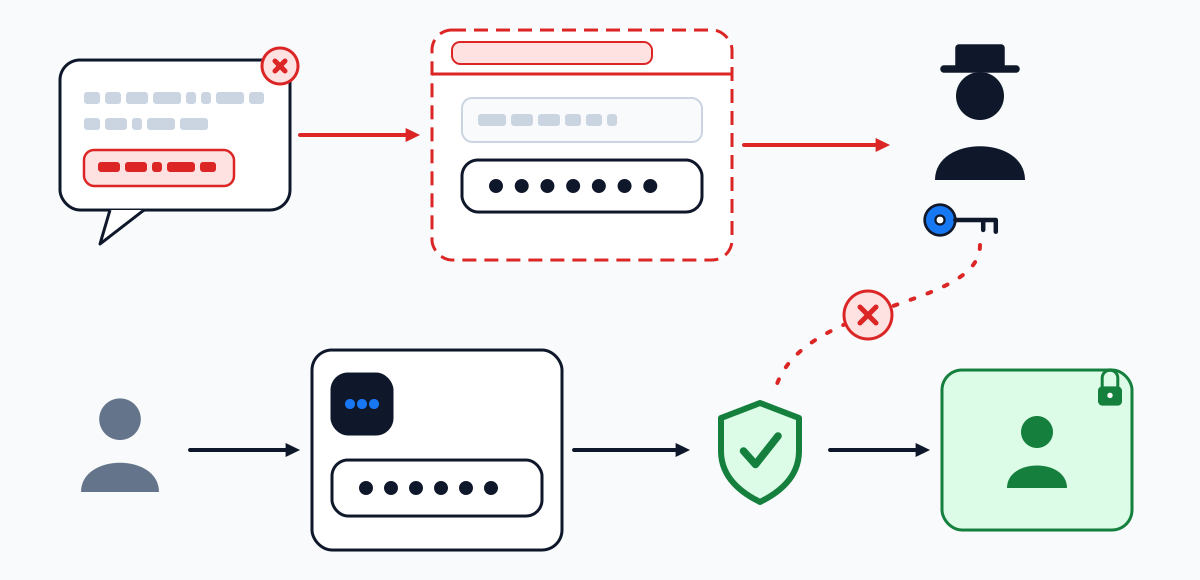
The chain Trend Micro traced for fake Instagram pages in 2021, link by link — with the point at which the owner can still break it.
- 1
Whatever is typed is accepted
The copy asks for the username and password — sometimes the mailbox password as well — and keeps any values without checking them.
Where the owner stops it Typed the real one? Treat it as delivered.
- 2
The owner is locked out
Once inside, the attacker sets a new password, so the owner can no longer sign in.
Where the owner stops it Get there first and change it yourself. If the account's email was swapped, the [email protected] message at your old address undoes it.
- 3
A ransom is demanded
Demands for money came next. In the documented cases, paying did not bring the accounts back.
Where the owner stops it The way back runs only through the platform: instagram.com/hacked.
- 4
The lure moves on to your contacts
The captured account sent the same bait to its contacts, and accounts were sold on.
Where the owner stops it Warn your contacts through another channel not to open links coming from your account.
Weigh the message
Is this message phishing? Six signs, weighed
Tick what is true of the message in front of you. The result says what to do first; it is not a verdict.
If you typed it
Typed your password on a fake login page? Six steps, in order
- 1
Change the password from the official app or site
Before anything else. On Instagram an updated password signs out every other device; on TikTok a password change does the same.
You should see: your other devices ask you to sign in again.
- 2
Secure the mailbox as well
If you typed the email password on the page, or it matches the one you typed, change it and give the mailbox its own second factor. Instagram's help warns that whoever reads your email can probably get into your Instagram too.
- 3
Sign out devices you do not know
Instagram and Facebook list them under Password and security → Where you're logged in. How to read that list and what a strange city means: Instagram login activity.
- 4
Check the contact details on the account
A swapped email is reversed from the old address: Instagram writes from [email protected] with a link that undoes the change, and Facebook sends a message with a special link.
- 5
Add a second factor
With it, a password harvested by a fake page no longer opens the account on its own. Methods and menus for each platform: two-factor authentication.
- 6
Report the page
Forward the phishing email to [email protected]. If money was lost or your identity is being used in India, 1930 and cybercrime.gov.in take the complaint — a complaint channel, not account recovery (details). Already locked out: Instagram routes back.
Questions
Fake login pages: short answers
How do I know if an Instagram link is a phishing link?
You do not need to judge the link — go around it. Open the app on your own and look for the same notice there. Threats with a deadline, shortened links and nearly-right addresses are the usual giveaways.
How can I check that an email from Instagram is real?
Find it under Recent emails in the app (Menu → Meta Account → Login and security). That list holds Instagram's official emails of the last 14 days; an email from that period that is missing cannot be confirmed as Instagram's, whatever the sender line shows. An older one can be missing simply because the list has moved on.
I opened the link but typed nothing. Is my account at risk?
A fake login page only collects what is typed into it, so it got no password from you. CISA does point out that links and attachments can carry malware as well — do not install or run anything the page offered. A look at Where you're logged in settles the rest.
Can I get an Instagram phishing link or a fake login page here?
No. This page is about recognising one and what to do after meeting one. It gives no way to build one.
Does two-factor authentication stop phishing?
Most of it, not all. Google's 2019 research on its own accounts found that an SMS code blocked 96% of bulk phishing attacks and an on-device prompt 99%. Those are Google figures, not Instagram's.
Where do I report a fake Instagram login page?
Send the message that led you there to [email protected]. In India, fraud or identity theft is reported to 1930 or on cybercrime.gov.in.
Take it with you
Save this page as your own plan
Print the page or save it as a PDF to keep the steps next to your phone while you go through the settings. Your checklist ticks are included.
- The printout opens every route and every answer on this page in full
- The file is made by your own browser — nothing is uploaded
- This site does not log in to anyone's account and asks for no username
Where next